
Introducing the Team Management Dashboard
The Team Management Dashboard is a new view in Studio Designer that shows each team member’s working hours next to their billed hours, so interior design firm owners…
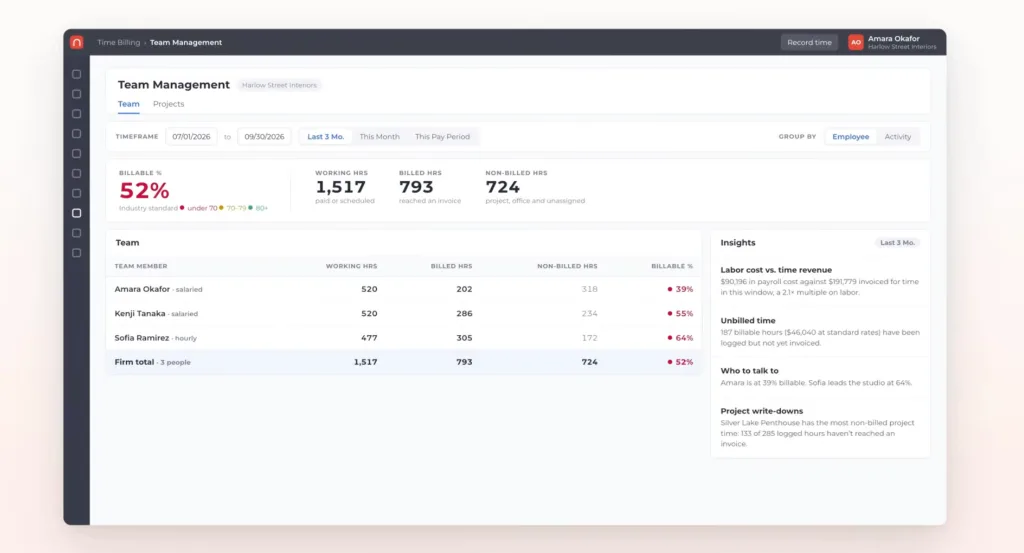
TL;DR: The Team Management Dashboard is a new view in Studio Designer that shows each team member’s working hours next to their billed hours, so interior design firm owners can see how much of their team’s time reaches client invoices. It is part of the Time & Team Management Suite (TTMS), which connects time entry, timesheets, invoicing, payroll, and the general ledger in one workflow inside Studio Designer.
Key takeaways
- The Team Management Dashboard compares working hours to billed hours by employee, by activity, and by project.
- Many interior design firms aim to bill 70 to 80% of paid hours to clients, and the dashboard shows where your team stands against that target.
- In the new Time Billing, you can save an invoice preview as a draft, share it with a project manager or principal for review, and finalize it when it is ready.
- Billing and payroll admins can now enter time for other users, and assistants can add time to the timesheets of the principals they support.
- Every feature runs on a single time entry that flows from the timesheet to the client invoice, to payroll, and to the general ledger without re-keying.
What is the Team Management Dashboard in Studio Designer?
The Team Management Dashboard is a live view of your team’s working hours and billed hours, side by side, for everyone at your firm. It answers two questions most interior design firm owners ask often: where does our team’s time actually go, and which projects are really making us money?
The dashboard is part of the Time & Team Management Suite (TTMS) in Studio Designer. TTMS helps design firms understand how their team spends its time and turn that time into accurate client invoices. Because the dashboard reads from the same time entries your team already logs, there is no separate report to build or spreadsheet to maintain.
What can you see on the Team Management Dashboard?
The Team Management Dashboard breaks working hours and billed hours into three views, so you can look at your firm’s time from the angle that matters for the decision in front of you.
| View | What it shows | Question it answers |
|---|---|---|
| By employee | Each person’s working hours and billed hours | Who is spending the most time on non-billable work? |
| By activity | Which types of work take the most time | Which tasks, such as sourcing, client meetings, or admin, absorb the most hours? |
| By project | Time spent compared with time billed on each project | Which projects are profitable, and which are losing hours that never reach an invoice? |
For example, if a project shows 120 hours worked and 70 hours billed, the project view makes that 50-hour gap visible while the project is still active, rather than after the final invoice goes out.
What is a good billable utilization rate for an interior design firm?
Many interior design firms aim to bill 70 to 80% of paid hours to clients. Billable utilization is the share of your team’s paid hours that end up on a client invoice, calculated as billed hours divided by paid hours.
A designer who works 40 paid hours in a week and bills 30 of them has a utilization rate of 75%, which sits inside that target range. If the same designer bills 22 hours, utilization drops to 55%, and the Team Management Dashboard shows that gap without anyone having to run the math by hand.
Not every role should hit the same number. Principals and project managers often carry more non-billable work, such as business development and team management, than junior designers do. Viewing utilization by employee in the dashboard lets you set expectations by role instead of applying one target to the whole firm.
How does one time entry flow through billing, payroll, and your books?
In the Time & Team Management Suite, a single time entry feeds every downstream step, so your team records an hour once and Studio Designer carries it through to the invoice, the paycheck, and the general ledger.
- Log the time. Team members clock in from their phone with Mobile Time or from within Studio Designer, and start an activity wherever they are working.
- Review the timesheet. Every entry lands on the team member’s timesheet, ready for review.
- Bill the client. Billable time becomes a client invoice in one click, so every hour worked is an hour billed.
- Run payroll. Managers approve the week and send it to Studio Payroll, where the hours are already filled in and nothing needs to be re-keyed.
- Update the books. Payroll posts to your general ledger automatically.
- Check profitability. The Team Management Dashboard shows which projects are profitable and which are not, based on the same entries.
Can you save an invoice preview as a draft in Studio Designer?
Yes. When you preview an invoice in the new Time Billing, you can save that preview as a draft before it goes to the client. Draft invoices give firms a review step without exporting files or passing printouts around the studio.
- Review before you send. Share the draft with a project manager or principal so they can check hours and line items.
- Edit as needed. Make changes based on their feedback directly in the draft.
- Finalize when ready. Turn the approved draft into a final invoice.
Can someone enter time on behalf of another team member?
Yes. Billing and payroll admins can now add time entries for other users from their admin pages in Studio Designer. This helps when someone forgets to log their hours before invoicing or payroll runs.
Assistants can also add time to the timesheets of the people they support. A common case is an assistant logging hours for a principal whose time is billed to clients, so that billable work still reaches the invoice even when the principal does not track time directly.
Frequently asked questions
What is the Time & Team Management Suite (TTMS)? TTMS is a suite of Studio Designer features that helps interior design firms understand how their team spends its time and turn that time into accurate invoices. It covers time entry, timesheets, Time Billing, payroll handoff, and the Team Management Dashboard.
How do you calculate billable utilization? Divide billed hours by paid hours. A team member who bills 32 of 40 paid hours has a billable utilization rate of 80%.
What utilization rate should an interior design firm target? Many design firms aim to bill 70 to 80% of paid hours to clients. The right target for each person depends on their role, since principals usually carry more non-billable work than designers.
Can my team track time from their phones? Yes. Team members can clock in from their phone with Mobile Time or from within Studio Designer, and every entry lands on their timesheet.
Do hours need to be re-entered for payroll? No. Once a manager approves the week, the hours flow into Studio Payroll already filled in, and payroll posts to the general ledger automatically.
Can an invoice be reviewed before it goes to the client? Yes. In the new Time Billing, you can save an invoice preview as a draft, share it with a project manager or principal, edit it, and then finalize it.
Who can enter time for someone else? Billing and payroll admins can add time entries for any user from their admin pages, and assistants can add time to the timesheets of the people they support.
Studio Designer is the leading digital platform for interior designers managing and growing their design businesses, featuring fully integrated project management, time billing, product sourcing, and accounting solutions.
Want to learn how Studio Designer can work for your design firm? Schedule a call with our team: https://www.studiodesigner.com/get-a-demo/
We can’t wait to connect.