What Should Interior Design Firm Owners Track Differently Starting Monday?
If an interior design firm owner changes one thing on Monday, it should be how the firm tracks time, including time spent on site and traveling to job sites…

TL;DR: If an interior design firm owner changes one thing on Monday, it should be how the firm tracks time, including time spent on site and traveling to job sites, showrooms, and conferences. When that time flows directly into client billing and payroll inside one connected system like Studio Designer, the firm stops re-entering hours, bills more accurately, and finally sees true project margins that include labor.
Key takeaways
- On-site and travel time is the time design firms most often lose, because it happens away from the desk and gets logged late or not at all.
- Tracking time in a standalone app means re-creating those hours later for client invoices and payroll. Studio Designer connects Mobile Time and Timesheets directly to client billing and Studio Payroll.
- Well-tracked time turns invoice-to-margin reporting into a view of the whole business, not just product markups.
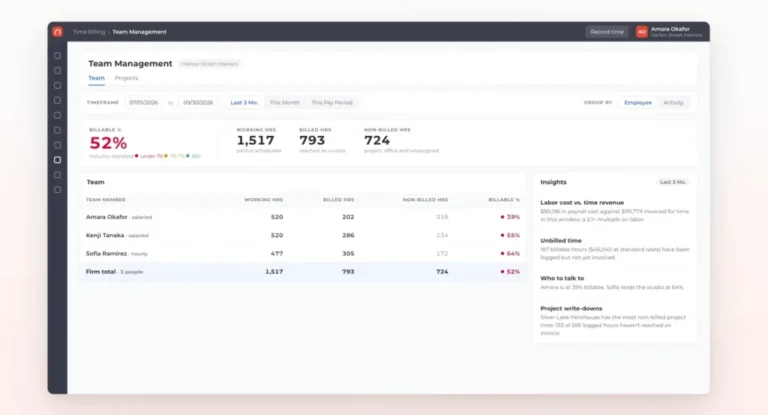
- A simple dashboard shows who worked on what, when, and whether it was billable or non-billable, without digging through spreadsheets.
- The same connected approach applies to procurement, where shifting lead times and frequent price increases make up-to-date dates essential to the client relationship.
Why is on-site and travel time the one thing to track differently?
On-site and travel time is the hardest time for a design firm to capture and the easiest to lose. Designers spend hours at job sites, walking showrooms, meeting contractors, and traveling out of state for installs or industry conferences. That work rarely gets logged in the moment, so it gets estimated later or never billed at all.
Tracking it differently means logging it where it happens. With Studio Designer Mobile Time, a designer can pull up a timesheet from a phone while heading to a site visit or a conference and record both the on-site hours and the travel time against the right project.
Capturing the time is only half the change. The bigger shift is making sure that time does not have to be touched again before it reaches a client invoice or a paycheck.
How does connected time tracking eliminate double entry?
Connected time tracking means hours are entered once and used everywhere they are needed. Firms that track time in a separate app have to re-create those hours in their accounting or invoicing system to bill clients, then again in their payroll provider to pay employees. Every re-entry takes time and introduces errors that someone has to catch and verify.
In Studio Designer, time flows through one path:
- A designer logs on-site, travel, or studio hours in Mobile Time or Timesheets.
- Billable hours attach to the client project and carry straight into client billing.
- The same hours feed Studio Payroll, powered by Gusto, so employees and principals are paid from the record that was already entered.
The result is a time savings for the business as a whole, not just for the designer filling out the timesheet. Bookkeepers and principals no longer reconcile two or three versions of the same week, and clients receive invoices that reflect the time actually spent on their project.
What does tracked time reveal about project margins?
Accurate time tracking shows a design firm its true margin on every project, not just its markup on furniture and materials. Invoice-to-margin reporting compares what a firm billed against what the work actually cost. When time is missing from that comparison, a project can look profitable on product while quietly losing money on labor.
Once on-site, travel, and studio hours are tracked in the same system as purchasing and invoicing, Studio Designer can include labor in the margin picture. A firm owner can see which projects, clients, or project types earn their keep and which ones absorb more designer hours than they bill.
What should a time and margin dashboard show?
A useful dashboard answers four questions without any digging:
- Who did the work
- What project or task it was for
- When it happened
- Whether it was billable or non-billable
Non-billable time matters as much as billable time. A steady rise in non-billable hours on one client is often the earliest signal that a project’s scope or fee structure needs a conversation.
ALSO READ: 6 Reasons Why Time Tracking for Interior Designers is Essential — Even If You Don’t Charge Hourly!
What if a design firm doesn’t have a dedicated procurement person?
Without a dedicated procurement person, someone at the firm, often a principal or lead designer, ends up tracking every order on every project. That job has grown harder since COVID. Vendor lead times change more frequently, and price increases that once arrived about once a year often happen periodically throughout the year.
Keeping those details current is more than an administrative task. Ship dates, delivery windows, and install dates are the heart of an interior design project, and they shape how much a client trusts the firm. A missed or outdated date is often what a client remembers most.
Studio Designer lets firms build custom procurement reports for different audiences from the same data:
- Client-facing reports that share order and delivery status without exposing internal cost details
- Internal reports for the design team and principals
- Receiving reports for the receiver or warehouse handling incoming deliveries
The client, the design team, and the receiver all see the same dates so everyone stays on the same page.
Frequently asked questions
Should interior designers bill clients for travel time?
Many interior design firms bill for travel time, either at the full hourly rate or a reduced travel rate, as set out in the client agreement. Whatever the policy, travel time should be tracked so the firm can bill it where the contract allows and see its true cost where it does not.
Can Studio Designer track time on a job site?
Yes. Studio Designer Mobile Time lets designers log on-site and travel hours from a phone and assign them to the correct client project in the moment.
Does Studio Designer time tracking connect to payroll?
Yes. Hours tracked in Studio Designer feed Studio Payroll, powered by Gusto, so employees and principals are paid from the same record used for client billing.
What is invoice-to-margin reporting?
Invoice-to-margin reporting compares what a firm invoiced on a project against what the project cost to deliver. Including tracked labor time, not just product cost, shows whether a project was actually profitable.
What is the difference between billable and non-billable time?
Billable time is work a firm charges a client for, such as design hours or site visits covered by the agreement. Non-billable time is work the firm absorbs, such as internal meetings, business development, or hours beyond a project’s fee.
How do design firms keep up with changing vendor lead times?
Firms keep up by tracking order status and dates in one system that updates as vendors change them. Studio Designer’s procurement agent and custom procurement reports keep clients, designers, and receivers working from the same dates.
Studio Designer is the leading digital platform for interior designers managing and growing their design businesses, featuring fully integrated project management, time billing, product sourcing, and accounting solutions.
Want to learn how Studio Designer can work for your design firm? Schedule a call with our team: https://www.studiodesigner.com/get-a-demo/
We can’t wait to connect.